
Samarth Portal 2026: Login, Registration, Documents and Result Guide
The Samarth Portal is the online system your university uses for admission, registration, exam forms, fee payment, admit cards, results and certificates. It is not one website. Every institution runs its own copy at its own address, which is exactly why students end up on the wrong page and wonder why their enrollment number will not work.

This guide fixes that. Below you will find the correct login address for major universities, the full registration walkthrough, the document sizes the upload box actually accepts, the reason your login keeps failing, and the contact route that gets a real answer. Everything here points you back to official government pages for the actual login step.
Disclaimer: SamarthPortal.org is an independent information website. We are not affiliated with, endorsed by, or connected to the Ministry of Education, the University of Delhi, or the official Samarth eGov Suite. We never ask for your password. All login and payment steps must be completed on your own university’s official portal.
What is the Samarth Portal?
The Samarth Portal is an open source e-governance platform built for Indian higher education institutions. Its formal name is the Samarth eGov Suite. A university installs it once and then runs admissions, student records, examinations, finance, human resources and hostel management through the same system instead of through separate offices and paper files.
For a student, that means one account handles your entire time at the university. You apply through it, pay through it, fill your exam form through it, download your admit card and marksheet from it, and request your bonafide certificate from it.
Who developed the Samarth Portal?
The platform was designed and developed by the University of Delhi and runs as an initiative of the Ministry of Education, Government of India. It sits under the National Mission on Education through Information and Communication Technology, usually written as NMEICT. The project began in 2019.
Development is housed at the Institute of Informatics and Communication at the University of Delhi South Campus. That is the same address the official support desk publishes, which is a useful sanity check: if a page claims to be Samarth support but gives a different institutional address, treat it with suspicion.
What is the full form of Samarth?
There is no full form. Samarth is not an acronym like AICTE or NAAC. समर्थ is a Hindi word meaning capable or empowered, and the government chose it as a name. The branded product name is Samarth eGov Suite, where eGov is short for electronic governance.
Any website presenting an expanded full form such as “System for Academic Management” has invented it. This matters because students sometimes write the invented full form in application essays or viva answers.
samarth.edu.in and samarth.ac.in: which one is real?
Both are official. They serve different purposes, and confusing them is the single most common navigation mistake.
| Address | What it is | Do you log in here? |
|---|---|---|
| samarth.edu.in | Project website with news, media coverage, adoption updates and institutional information | No |
| samarth.ac.in | Product website for the Samarth eGov Suite and its module documentation | No |
| yourcollege.samarth.edu.in | Your university’s live student portal | Yes |
| yourcollegeadmission.samarth.ac.in | Your university’s admission portal, often a separate address | Yes, for applicants |
The lesson: the two national addresses are information sites. Your login lives on a subdomain named after your institution. Save that subdomain as a bookmark and stop searching for it every time.
Why Indian universities moved to the Samarth Portal
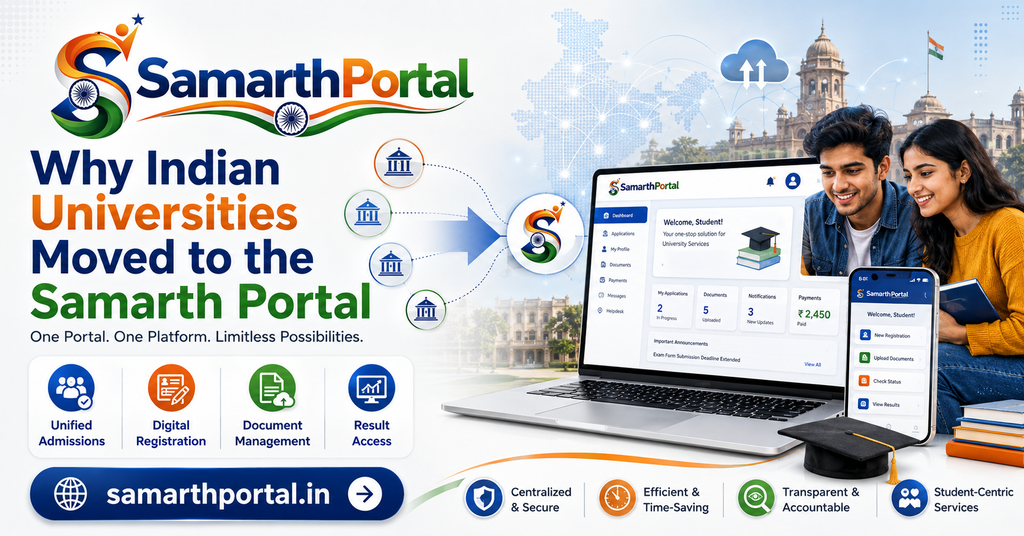
Before 2019, most state universities ran admissions on locally built software or outsourced systems that did not talk to each other. A student’s application data sat in one system, their exam record in another, and their fee record in a third. Reconciling them meant physical files moving between departments.
What changed for students
Applications that used to require a demand draft and a courier now finish in a browser session. Exam forms that needed a signature from three desks now route digitally through your college for verification. Results appear on your dashboard instead of on a notice board.
The less obvious benefit is the record trail. Every submission generates a PDF with a reference number. When something goes wrong three months later, that PDF is your evidence.
What changed for colleges
Affiliated colleges now enter and verify student data directly. This is why so many portal problems trace back to the college rather than the university: if your name, category, semester or subject list is wrong on the portal, someone at your college entered it that way, and only they can correct it at source.
Who uses the Samarth Portal
| User type | How they get access | Main modules used |
|---|---|---|
| Applicants | Self-registration during the admission window | Admission, fee payment |
| Enrolled students | Credentials issued by the college after admission | Exam, result, fee, hostel, certificates |
| Faculty | Employee ID issued by the IT cell | Attendance, internal marks, course allocation |
| Administrative staff | Role-based account from the registrar’s office | Finance, HR, payroll, records |
| College admins | Nodal officer account from the university | Data entry, verification, forwarding |
Samarth Portal login addresses by university
Below are the addresses for institutions that receive the highest search volume. Open the link, then bookmark it. Do not log in through a search result you have not verified.
| University | Samarth Portal address | Primary use |
|---|---|---|
| University of Delhi (DU) | du.samarth.edu.in | Student services |
| IGNOU | ignou.samarth.edu.in | Student services, ID card |
| Banaras Hindu University (BHU) | bhu.samarth.edu.in | Student services |
| Gauhati University | gauhati.samarth.edu.in | Student services |
| Assam state admissions | assamadmission.samarth.ac.in | Centralised UG admission |
| Assam student portal | assam.samarth.edu.in | Post-admission services |
| VBSPU Jaunpur | vbspu.samarth.edu.in | Exam form, result |
| CSJMU Kanpur | csjmu.samarth.edu.in | Admission, result |
| Pondicherry University | pondiuni.samarth.edu.in | Student dashboard |
| Mumbai University | mu.samarth.edu.in | Student services |
| DSEU Delhi | dseuadm.samarth.edu.in | Admission |
| Dibrugarh University | dibru.samarth.edu.in | Student services |
Not listed here? Open our full directory of Samarth Portal university addresses, where every entry carries the date we last verified it.
How to check a Samarth address is genuine
Three checks, ten seconds. First, the domain must end in .samarth.edu.in or .samarth.ac.in. Second, there must be a padlock in the address bar. Third, the footer should credit the University of Delhi and the Ministry of Education. If any of the three fails, close the tab.
How to sign up on the Samarth Portal
Registration applies to applicants. If you are already admitted, skip to the login section, because your college creates your account for you.
Before you begin
Collect these first. Half of all failed registrations happen because someone started without them and the session timed out.
- Class 10 certificate, for the exact spelling of your name and your date of birth
- An email address you can open right now
- A mobile number that is receiving SMS on the device in front of you
- Scanned photograph and signature, already resized
- Category certificate if you are claiming reservation
Samarth Portal registration steps
- Open your university’s admission address from the table above.
- Click New Registration or Register.
- Enter your name exactly as printed on your Class 10 certificate, including middle name and spelling.
- Enter your date of birth as printed on the same certificate.
- Enter your email and mobile number.
- Request the OTP and verify both channels.
- Set a password you will remember, then write it down somewhere physical.
- Submit and note the registration or application number that appears.
- Log out, then log in again with the new credentials to confirm they work.
The name field is not editable later
This is the mistake that costs students the most time. Many universities lock the name and date of birth fields after final submission. If your Class 10 certificate says Ramesh Kumar Yadav, do not type Ramesh Yadav because it is shorter. Correcting it afterwards means a written application, supporting documents, and weeks of waiting.
One account only
If registration fails halfway, do not start a second account with a different email. Duplicate registrations create a conflict in the backend that only the university team can merge. Use the password reset route instead.
How to log in to the Samarth Portal
Once your account exists, the login itself takes under a minute.
Student login
- Open your university’s Samarth Portal address.
- Click Login or Sign In.
- Enter your user ID. Depending on the institution this is your enrollment number, registration number, application number or registered email. Check which one your university uses before assuming.
- Enter your password.
- Type the captcha exactly as shown, including capital letters.
- Click Login.
Faculty and staff login
Faculty use the employee ID issued by the university IT cell, with an initial password set by that cell. Some universities add OTP verification or restrict admin logins to campus IP ranges, so a login that works in the department may fail from home.
What to do in your first session
Four things, in this order. Change the password the institution gave you. Verify that your name, date of birth and category are correct, and report anything wrong to your college the same day. Upload your photograph and signature. Confirm your mobile number and email are current, because every future password reset depends on them.
A note on default passwords
Some websites publish a supposed universal default password pattern for Samarth accounts. Ignore that. Default credentials are set by each institution and vary, and treating a published pattern as fact encourages both account compromise and wasted lockouts. If you were not told your initial password, ask your college office or IT helpdesk. Nobody else can legitimately tell you.
Samarth Portal login errors and how to fix them
Most login failures come from a small set of causes. Work through this table before contacting anyone.
| Error message | Most likely cause | Fix |
|---|---|---|
| Invalid username or password | Wrong ID type, or caps lock | Try enrollment number and registered email in turn; retype the password in a text box first to check it |
| Invalid captcha | Case mismatch or expired page | Refresh the page for a new captcha and type it exactly, matching capitals |
| Account locked | Too many failed attempts | Wait for the lockout window to pass, then use password reset instead of guessing again |
| OTP not received | Outdated mobile number in university records | Try the email OTP option; if neither arrives, your contact details need correction at the college office |
| Page not loading or timing out | Server load near a deadline | Try outside 10am to 6pm, and never leave submissions to the final day |
| Session expired repeatedly | Stale cookies or browser extensions | Clear cache and cookies, disable extensions, or use a private window |
| Login works but dashboard is empty | College has not completed data entry | Contact your college, not the university; the record is missing at source |
| Captcha image not displaying | Blocked content or slow connection | Switch browser, or disable ad blockers on the portal domain |
When the problem is not yours to fix
Missing subjects, a wrong semester, an incorrect category, or a name that does not match your certificates are all data entry issues. They live in your college’s records and propagate to the portal. Emailing the university directly usually results in being redirected back to your college, so start there and save a week.
Password reset on the Samarth Portal
- On the login page, click Forgot Password.
- Enter your registered email or enrollment number.
- Collect the OTP from your registered mobile or email.
- Enter the OTP and set a new password.
- Log in immediately to confirm the change took effect.
If no OTP arrives on either channel, the contact details held by the university are out of date and no amount of retrying will help. That correction has to happen through your college office. Our password reset guide covers the escalation path in more detail.
Documents required on the Samarth Portal
Document rejection is the most common reason an application stalls. Two rules cover almost every case: the scan must be readable, and the file must be within the size band the portal specifies.
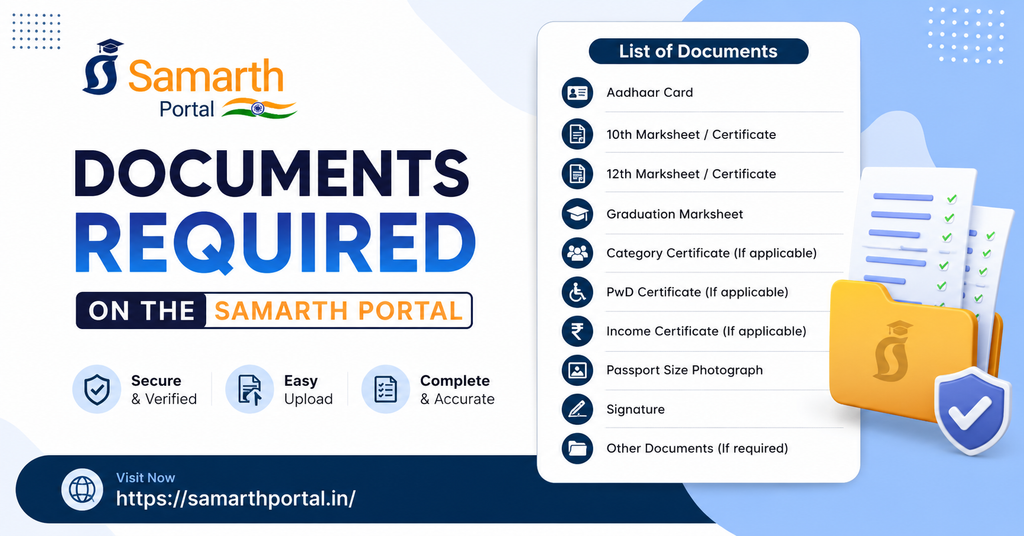
Documents you will usually need
| Document | Who needs it | Common format |
|---|---|---|
| Passport photograph | Everyone | JPG or JPEG |
| Signature | Everyone | JPG or JPEG |
| Class 10 marksheet or certificate | Everyone, for name and date of birth | |
| Class 12 marksheet | UG applicants | |
| Graduation marksheet or provisional certificate | PG applicants | |
| Category certificate | SC, ST, OBC-NCL, EWS applicants | |
| Income certificate | EWS and scholarship applicants | |
| PwD certificate | Applicants claiming disability provisions | |
| Photo identity proof | Most institutions | |
| Migration or transfer certificate | Students from another board or university | |
| Experience certificate | Selected professional programmes |
File size limits
Size limits are configured by each institution, so a number that works at one university may be rejected at another. The upload box on your portal always states the limit for that field, and that number overrides anything printed on any website, including this one.
The ranges below reflect what the majority of Samarth instances currently accept, and are useful for preparing files in advance.
| File | Common accepted range | Typical dimensions |
|---|---|---|
| Photograph | 10 KB to 500 KB | Passport size, plain background |
| Signature | 5 KB to 500 KB | Wider than tall, black ink on white |
| Educational documents | Up to 1 MB (1024 KB) | Full page, all four edges visible |
| Category and other certificates | Up to 1 MB | Full page, issuing authority visible |
How to get a file under the limit
Scan or photograph in good light rather than scanning a photocopy. Save as JPG rather than PNG for images, which typically cuts file size by more than half. If a PDF is still too large, use a free compressor and re-check that the text is still readable afterwards. A compressed file that nobody can read gets rejected the same as an oversized one.
Signature scans that get rejected
Sign in black or dark blue ink on plain white paper, inside a drawn rectangle, then crop to that rectangle. Signatures rejected most often are the ones photographed on lined paper, signed in pencil, or cropped so tightly that part of the stroke is cut off.
Exam form, admit card and result
Filling the exam form
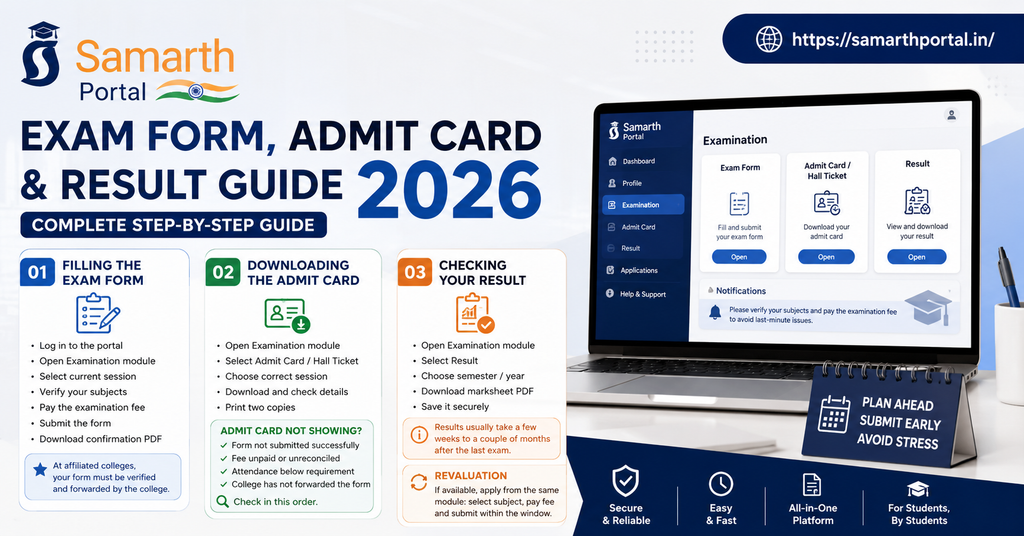
Log in, open the Examination module, select the current session, verify that your listed subjects match what you actually studied, pay the examination fee, and submit. Download the confirmation PDF before closing the tab.
At universities with affiliated colleges, submission is not the end of the process. Your college has to verify and forward your form. Submitting on the final day leaves no room for that step, and a form stuck in verification is the most common reason an admit card never appears.
Downloading the admit card
Log in, open the Examination module, select Admit Card or Hall Ticket, choose the correct session, and download. Check your name, roll number, subject list, exam dates and centre against your own records before printing. Print two copies.
Admit card not showing
Four causes account for nearly all cases: the exam form was never submitted successfully, the examination fee is unpaid or unreconciled, attendance is below the required threshold, or the college has not yet forwarded the form. Check them in that order. Our admit card guide walks through each.
Checking your result
Log in, open Examination, select Result, choose the semester or year, and download the marksheet PDF. Save it in more than one place. You will be asked for it during job applications, higher study admissions and scholarship verification for years afterwards.
If your result has not appeared, it is usually still being processed. Result timelines vary widely by university and programme, from a few weeks to a couple of months after the last paper.
Revaluation
Where the university offers it, revaluation is requested from the same Examination module: select the subject, pay the prescribed fee, and submit within the stated window. Windows are short, often a week or two after the result, and there is no reopening once they close.
Fee payment on the Samarth Portal
Payments go through a bank gateway integrated with your university’s portal. UPI, debit card, credit card and net banking are supported at most institutions.
Steps
- Log in and open the Fee or Payment section.
- Select the fee type: application, semester, examination, hostel or other.
- Confirm the amount displayed.
- Choose a payment method and complete the transaction on the bank page.
- Wait for the automatic redirect back to the portal. Do not close the tab.
- Download the receipt generated by the portal, not just the bank SMS.
Money deducted but payment shows as failed
This happens most often near deadlines when the gateway is under load. Do not pay again on the same day. A second payment while the first is pending is how students end up chasing two refunds instead of one.
Check your bank account first, since reversals commonly complete within a few working days. If nothing returns, open Payment History in the portal, note the transaction reference, and raise a grievance with that reference plus a screenshot and your bank statement. Our failed payment guide sets out the escalation sequence.
Samarth Portal statistics and scale
Numbers help you judge what to expect from the system, particularly around deadlines.
| Measure | Figure | Source |
|---|---|---|
| Project launched | 2019 | Ministry of Education, NMEICT |
| Developed by | University of Delhi | Samarth eGov Suite |
| Software modules | More than 40, grouped into 9 packages | Samarth eGov brochure |
| Institutions using Samarth | 200 or more | Samarth eGov |
| Institution types covered | Central universities, state universities, colleges, NITs, IIITs, IIMs, IISERs | Samarth eGov |
| Licensing model | Open source, open standard | Samarth eGov Suite |
The practical takeaway is load. When a state runs centralised admissions for lakhs of applicants through a single deadline, the portal slows. Every experienced user finishes three to five days early for exactly this reason.
Samarth Portal contact and helpdesk
There is no single national student helpline. Support is layered, and going to the wrong layer wastes days.
Who to contact, in order
| Problem | Contact |
|---|---|
| Wrong name, category, subjects, semester or missing record | Your college office first |
| Login, OTP or password issues | Your university IT helpdesk |
| Payment failure or refund | Your university accounts section, and your bank |
| Exam form, admit card, result queries | Your university examination section |
| Anything unresolved after the above | Grievance module inside your portal |
Official Samarth contact details
These are for the Samarth project team, not for individual student account problems. Sending a login query here will get you redirected to your university.
- Project website: https://samarth.edu.in/
- Suite website: https://samarth.ac.in/
- Support desk: https://scdn.samarth.ac.in/contact/
- Address: Institute of Informatics and Communication, University of Delhi South Campus, Benito Juarez Road, New Delhi 110021
Individual Samarth instances publish their own contact block. As one example, the Shri Lal Bahadur Shastri National Sanskrit University admission portal lists infosamarth@samarth.ac.in for technical queries, with helpline hours of 10:00 to 17:00, Monday to Friday. Your university’s contact page will list its own equivalent, and that is the one you should use.
Contacts we will not publish
We do not list helpline numbers we have not verified against an official page, and we do not carry numbers found in forwarded messages. If you are offered paid “Samarth login help” on WhatsApp or Telegram, it is a scam. The portal is free, and no legitimate helper needs your password.
Is the Samarth Portal safe to use?
The platform itself is a government e-governance system used by central and state institutions, with OTP verification and captcha on login. The realistic risk is not the portal. It is the fake pages that copy its layout during admission season.
Four habits that prevent almost every problem
Bookmark your university subdomain and always enter through the bookmark. Never share your password, including with a friend filling your form. Download and store every PDF the portal generates. Change your password after the college gives you an initial one.
Frequently asked questions about the Samarth Portal
What is the Samarth Portal used for?
Admission, registration, exam form submission, fee payment, admit card download, result checking, hostel applications, digital ID cards, bonafide certificates and grievance filing, depending on which modules your institution has enabled.
What is the official Samarth Portal website?
samarth.edu.in and samarth.ac.in are the official national websites, but you do not log in at either. Your login is on your institution’s subdomain, such as du.samarth.edu.in or ignou.samarth.edu.in.
Is the Samarth Portal free?
Yes. There is no charge for using it. You pay only the university’s own fees for applications, semesters, examinations and hostels. Anyone charging for access or login help is not legitimate.
How do I find my university’s Samarth Portal link?
Check the table above, or open our full directory. If your university is not listed, look for a Samarth or Student Portal link on the official university website rather than trusting a search result.
What is the default password for the Samarth Portal?
It varies by institution and is issued by your college or university IT cell. There is no universal default, and websites publishing one are guessing. Ask your college if you were not given credentials.
Can I edit my admission form after submitting it?
Usually not. Most institutions lock the form after final submission and payment. Some open a short correction window, announced separately. Verify every field before you submit.
Why is my Samarth Portal admit card not showing?
Commonly an unsubmitted or unverified exam form, unpaid examination fee, attendance shortfall, or a form your college has not yet forwarded. Check those four in order.
Money was deducted but my payment failed. What now?
Do not pay again the same day. Check for an automatic reversal in your bank account over the next few working days, then raise a grievance with the transaction reference, a screenshot and your bank statement if the money has not returned.
Is there a Samarth Portal mobile app?
Institutions access Samarth through a browser, and the interface works on phones. If you want an app-like shortcut, open your portal in Chrome, tap the menu, and choose Add to Home Screen. Be cautious with third-party apps claiming to be official Samarth apps.
Who do I contact for Samarth Portal problems?
Your college for data errors, your university IT helpdesk for login problems, your university accounts section for payments, and the grievance module inside the portal for anything unresolved.
Is samarthportal.org the official Samarth website?
No. This is an independent information site. The official platform is run by the Ministry of Education and the University of Delhi. Always complete logins and payments on your own university’s official Samarth address.